

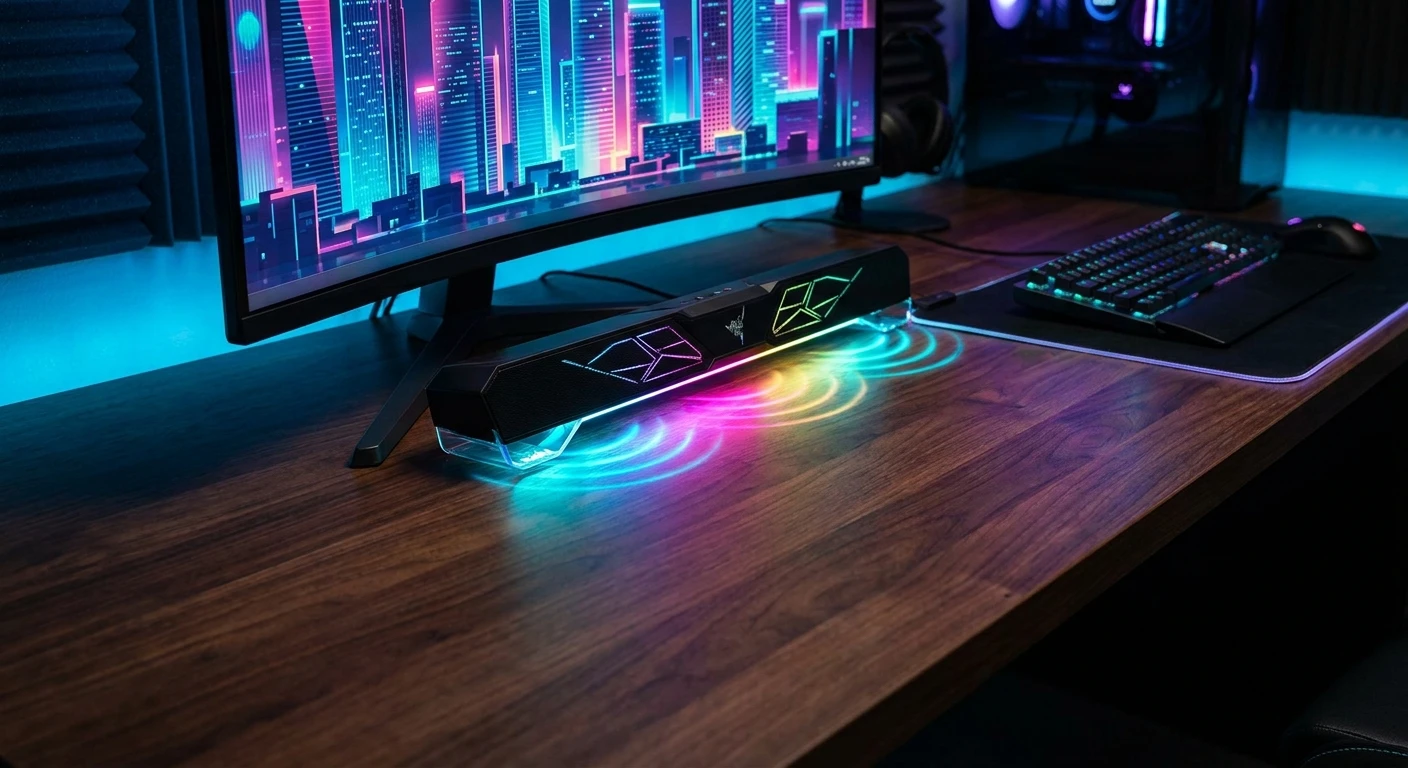
Razer Leviathan V2 X: Compact Audio Revolutionized
The Razer Leviathan V2 X delivers a massive auditory punch without monopolizing your precious desk space. If you want a clean gaming environment, you already understand the struggle of trying to fit multiple giant speakers, a massive receiver, and thick cables around your monitors. The trend in modern PC building heavily favors sleek minimalism and maximized mouse-swiping area. Giant surround sound systems are rapidly giving way to smart, under-monitor solutions that streamline the entire experience. This specific model stands out as a brilliant USB Type-C powered soundbar engineered exclusively for seamless integration into high-performance multimedia setups.
Why is this device drawing so much attention? Space is a premium commodity for content creators, remote workers, and competitive gamers alike. High-fidelity sound quality remains entirely non-negotiable for an immersive experience, but bulky arrays simply do not fit anymore. Connecting one single cable to handle both electrical power and digital audio transmission eliminates the dreaded rat nest of wires hiding behind your screen. This hardware bridges the gap between massive multi-speaker arrays and those incredibly weak built-in monitor speakers, providing dynamic, full-range acoustics backed by signature Razer Chroma RGB lighting. It is meticulously engineered for PC users who prioritize both striking aesthetics and uncompromising acoustic clarity. When comparing various options for an immersive desktop upgrade, this compact powerhouse consistently ranks at the top for maximum efficiency.
Read also: PlayStation TV: Complete Guide to Sony's Microconsole; The Best 70 Inch Smart TV Models for Your Home.
As desktop environments evolve, the demand for versatile hardware skyrockets. You need equipment that adapts instantly from intense competitive gaming sessions to relaxed background music listening while working. Let us break down exactly how this sleek audio device changes the layout of your gaming station and why ditching the massive subwoofer might actually be the smartest desk upgrade you make all year.
Maximizing Value and Desktop Efficiency
The core advantage of switching to a streamlined audio setup revolves around acoustic engineering and physical footprint management. You gain the ability to hear crisp dialogue, booming sound effects, and spatial audio cues without sacrificing half of your desk surface. Let us look at a direct comparison of features that define this specific piece of hardware.
| Hardware Feature | Technical Specification | Practical User Benefit |
|---|---|---|
| Audio Drivers | Two full-range drivers and two passive radiators | Delivers rich stereo sound and decent low-end punch without needing a separate floor subwoofer. |
| Connectivity Protocol | USB Type-C and Bluetooth 5.0 | Allows instantaneous switching between PC audio and mobile device audio with a single button. |
| Power Delivery | Single USB Type-C connection | Removes the need for a bulky AC wall adapter, pulling all necessary power directly from the PC. |
| Lighting System | 14-zone Razer Chroma RGB | Customizable lighting that syncs automatically with other peripherals and on-screen gameplay. |
Understanding the value proposition requires looking at everyday scenarios where this speaker shines. Think about the physical layout of your room. By removing the standalone bass box usually required by 2.1 systems, your legroom increases instantly. By routing audio and electricity through one port, cable management becomes practically effortless.
- Absolute Desktop Optimization: Sliding perfectly beneath a standard monitor stand reclaims desk surface area for ultra-wide mousepads and secondary displays.
- High-Fidelity Audio Consistency: Fills the near-field listening area with a maximum volume of 90 decibels, ensuring loud, distortion-free output during intense multimedia consumption.
- Aesthetic Synergy: The matte black finish and underglow RGB matrix blend flawlessly with existing premium gaming peripherals, creating a unified visual theme.
- Mobile Device Integration: Bluetooth functionality means you keep listening to your podcast or music playlist directly from your phone while your PC is booting up or installing software updates.
Origins of the Desktop Soundbar
To appreciate the current technology, you must look at the history of computer audio. During the late nineties and early two thousands, PC audio was dominated by large beige boxes that offered terrible sound reproduction. Users who wanted better quality had to purchase massive 2.1 or 5.1 surround systems. These required thick speaker wire, massive power bricks, and a dedicated subwoofer unit that sat on the floor, gathering dust and tangling with footrests.
Evolution of the Leviathan Lineup
The original audio gear from this brand featured a traditional soundbar paired with a very large, heavy subwoofer. It sounded fantastic but took up a massive amount of space and required multiple wall outlets. As aesthetic trends shifted toward clean, wireless-looking desks, the engineers recognized the need for a highly streamlined version. They developed the V2 series to feature better spatial audio and more refined aesthetics. Eventually, they created the X variant specifically to strip away the standalone bass unit entirely, packing maximum resonance into a single, standalone bar.
Modern State of PC Audio
Today, efficiency drives hardware design. Modern motherboards feature high-wattage ports capable of driving serious peripherals. The Razer Leviathan V2 X capitalizes on this technological shift perfectly. By utilizing advanced digital signal processing and smart acoustic chamber design, it mimics the depth of older, bulkier systems. The modern gamer demands plug-and-play simplicity, zero latency, and seamless software integration, all of which represent the current benchmark for premium desk accessories.
Acoustic Architecture Explained
How does a compact device produce loud, clear sound? The secret lies in the specific arrangement of its internal components. Unlike cheap plastic speakers that use tiny, low-quality cones, this unit utilizes dual full-range drivers. A full-range driver is engineered to reproduce as much of the audible frequency spectrum as possible, covering crisp highs and solid mid-range tones. However, generating deep bass frequencies traditionally requires a large vibrating cone. To solve the space constraint, engineers employ passive radiators. A passive radiator is a speaker cone without an attached voice coil or magnet. Instead of being driven by electricity, it moves in reaction to the air pressure created by the active drivers inside the sealed enclosure, effectively amplifying low-end thumps without requiring the volume of a giant box.
Power Delivery and USB Type-C Standard
The most fascinating technical aspect of this device is its power delivery method. Older USB 2.0 ports could only supply a maximum of 2.5 watts of power, which is barely enough to charge a flip phone, let alone drive a high-fidelity speaker. The adoption of the Type-C standard changes the paradigm completely. A modern port can deliver significantly higher wattage while simultaneously transmitting uncompressed digital audio data.
- Maximum Volume Output: Reaches up to 90 decibels at a distance of one meter, rivaling much larger traditional desktop monitors.
- Dynamic Frequency Range: Maps a response range of 85 Hertz to 20,000 Hertz, ensuring clear dialogue and bright acoustic melodies.
- Advanced Lighting Matrix: Features a custom 14-zone Chroma underglow system that reacts to dynamic audio and user-defined software profiles.
- Low-Latency Wireless: Utilizes Bluetooth 5.0 protocols to maintain a stable, stutter-free connection when paired with mobile phones or tablets.
Step 1: Physical Placement and Positioning
The perfect audio experience begins with proper physical positioning. Clear the area directly beneath your primary monitor. Center the soundbar perfectly parallel to your screen to ensure the stereo image aligns with the visual action. The slightly angled upward tilt of the device naturally directs the sound waves straight toward your ears when seated in a standard ergonomic desk chair. Ensure no keyboards or thick books block the front grille.
Step 2: USB Type-C Connection Route
Identify a high-speed Type-C port on the rear I/O shield of your computer motherboard rather than a front-panel case port. Rear ports generally offer more stable, direct power delivery straight from the power supply. Route the included cable neatly behind the monitor arm or through a dedicated cable management routing hole to maintain the clean aesthetic this speaker was designed to provide.
Step 3: Razer Synapse Installation
Once physically connected, Windows will likely recognize the device instantly as a generic USB audio output. However, to unlock its full potential, navigate to the official manufacturer website and download the Synapse 3 software suite. This program serves as the central command hub for all advanced features, firmware updates, and equalization customization. Follow the standard installation prompts and restart your machine.
Step 4: Firmware Updates and Initialization
Open the Synapse software. The application will usually flag a new device and immediately search for the latest firmware. Always execute these updates before playing music. Firmware patches often contain crucial bug fixes for Bluetooth stability, improvements for digital signal processing, and optimizations for power draw efficiency. Let the update complete fully without disconnecting the cable.
Step 5: Customizing the EQ Settings
Audio is highly subjective, and the default flat equalization might not suit your specific tastes. Navigate to the audio tab within Synapse. Here you find a 10-band custom equalizer alongside several presets tailored for gaming, movies, and music. If you play competitive shooters, boost the high-mid frequencies to highlight footsteps. If you primarily listen to electronic music, slightly elevate the lower bands to maximize the passive radiators’ output.
Step 6: Syncing Chroma RGB Lighting
Visual aesthetics heavily influence the desktop experience. Move over to the Chroma Studio tab. If you own other compatible peripherals like a mouse or keyboard, you can synchronize the lighting effects across all devices. Set up an audio meter effect where the 14-zone underglow pulses in direct relation to the beat of your music, or select a static ambient color that matches your custom PC water-cooling loop.
Step 7: Pairing Mobile Devices via Bluetooth
Finally, configure your secondary audio source. Press and hold the Bluetooth button located on the top of the soundbar until the indicator light flashes blue. Open the Bluetooth settings menu on your smartphone or tablet and select the Razer Leviathan V2 X from the list of available devices. Once paired, you can seamlessly toggle between listening to PC audio via the wired connection and streaming podcasts from your phone with a simple button press.
Myth: You Cannot Get Good Audio Without a Subwoofer
Reality: While a dedicated floor unit will naturally move more air and create deeper sub-bass for a home theater, modern acoustic engineering uses passive radiators to generate a highly satisfying low-frequency response for near-field listening. Sitting two feet away from the speaker ensures you feel the impact without annoying your neighbors.
Myth: USB Power is Not Loud Enough for Gaming
Reality: The Type-C specification provides ample wattage to drive these specific full-range speakers to 90 decibels. This volume level is more than sufficient to fill a standard bedroom or home office with rich, undistorted sound. You will rarely need to push the Windows volume slider past sixty percent.
Myth: Bluetooth Audio Lags Horribly During Video Playback
Reality: Early iterations of wireless audio suffered from severe desynchronization, but Bluetooth 5.0 drastically reduces latency. When watching YouTube on your phone connected to the soundbar, the audio and video remain tightly synced. For zero-latency competitive gaming, you simply switch back to the hardwired PC connection.
Myth: Soundbars Block Monitor Stands and Cables
Reality: This hardware measures roughly 400 millimeters in length and 71 millimeters in height. It is specifically sculpted to sit flush beneath the vast majority of flat-panel displays on the market today, actually hiding monitor cables rather than obstructing them.
Does it have a traditional 3.5mm headphone jack?
No. This device is purely a speaker output system designed for USB and wireless connectivity. It does not act as an audio passthrough hub for wired analog headphones.
Can I connect the Razer Leviathan V2 X to a television?
While physically possible if your TV supports Type-C audio output or Bluetooth audio broadcasting, it is heavily optimized and primarily intended for desktop PC use where the listener sits very close to the unit.
Is a bulky wall power adapter included in the box?
No. One of the greatest benefits of this hardware is that it draws all necessary operational power directly from your computer, eliminating the need for an external AC power brick.
Does the soundbar support THX Spatial Audio?
No, this specific model provides high-quality stereo sound. If you require advanced THX Spatial audio algorithms, you would need to look at the larger, more expensive models in the product lineup.
How long is the included USB connection cable?
The included cable is a standard desktop length, measuring approximately 1.5 meters. This provides plenty of slack to reach the rear ports of a computer tower sitting on the floor beside the desk.
Does it have an internal battery for portable use?
No. Despite having wireless pairing capabilities, the unit lacks an internal battery and must remain tethered to a powered port to function at all times.
Can I completely turn off the RGB lights?
Yes. The lighting matrix is fully controllable. You can reduce the brightness to zero using the hardware buttons or disable the illumination entirely through the Synapse software suite.
The Ultimate Audio Upgrade
Upgrading your desktop sound system does not mean you have to sacrifice your clean workspace. The Razer Leviathan V2 X perfectly balances acoustic performance with a minimalist physical footprint. By leveraging a single cable for both data and power, incorporating smart passive radiators, and integrating vibrant lighting, it solves multiple desktop setup problems simultaneously. If you are tired of weak monitor audio but refuse to clutter your desk with massive speaker boxes, this piece of hardware is the exact solution you need. Optimize your gaming station and experience high-fidelity audio today.





Leave a Reply